STL vs 3MF: which file should you print from?
Both files open in every modern slicer, so it is fair to wonder why there are two. The short version is that STL remembers the shape and nothing else, and 3MF remembers the job.
Short answer
Use 3MF when you can. An STL file is a list of triangles with no units, colours, parts or settings, so the slicer has to guess. A 3MF file is a zipped package that stores units, several parts in their positions, colours, materials and (in Bambu Studio, Orca and PrusaSlicer project files) the plate and print settings. STL is still fine for a single, one-colour part. If you want to edit the design later, keep the CAD source or a STEP file, because neither STL nor 3MF keeps the dimensions editable.
Download a model from any big model site and you’ll often get a choice: STL or 3MF. Both open in Bambu Studio, OrcaSlicer, PrusaSlicer and Cura. Both print the same shape. So the choice looks cosmetic, until an STL arrives 25 times too small, or a twelve-part kit lands on the plate as a single tangled lump.
What an STL remembers
STL dates from 1987 and describes one thing: the surface of a shape, as a long list of triangles. Each triangle is three corner points and a direction. That is the whole format.
Everything else is missing:
- No units. The numbers could be millimetres, inches or metres. Slicers assume millimetres, which is why a model exported in inches imports at 1/25.4 of its size.
- No parts. Twelve pieces become one mesh. The slicer has to split them apart again, and it can’t tell which pieces were meant to be separate objects.
- No colour or material. A multi-colour model needs one STL per colour, lined up by hand.
- No settings. Orientation, supports, layer height and plate layout are all left for you to redo.
STL is also inefficient. Every corner point is written out again for every triangle that shares it, so files are large for what they contain.
What a 3MF remembers
3MF (3D Manufacturing Format) was created in 2015 by a consortium of software and printer companies to fix exactly that list. A 3MF file is a ZIP archive with a structured description inside. Rename one to .zip and you can open it and look.
- Units are stored, so the size is never a guess.
- Several objects, each with its name and position, in one file.
- Colours and materials per object or per face.
- Shared corners, so the same shape takes up much less space than in STL.
- Project data. Bambu Studio, OrcaSlicer and PrusaSlicer save whole projects as 3MF: plates, orientation, supports, modifiers and print settings. Open it and you are where the author left off.
Side by side
| STL | 3MF | STEP | |
|---|---|---|---|
| Stores | Triangles only | Triangles plus units, parts, colours, settings | Exact CAD surfaces and solids |
| Units | No (assumed mm) | Yes | Yes |
| Multiple parts | Merged into one mesh | Yes, named and positioned | Yes |
| Colour and material | No | Yes | Colour, sometimes |
| Print settings and plates | No | Yes (project files) | No |
| Editable dimensions | No | No | Better: exact geometry, but no design history |
| File size | Large | Small (compressed) | Medium |
| Opens in slicers | All | All modern slicers | Some (PrusaSlicer, Bambu Studio, OrcaSlicer) |
When STL is still the right choice
STL is not wrong, just limited. It is still the easiest file to share for a single-colour, single-part model: every tool on earth reads it, and there are no settings to clash with the receiver’s printer. Most model sites still expect it. If a model is one piece in one colour, an STL loses nothing that matters.
Reach for 3MF when a model has several parts, several colours, or careful orientation and supports you want to keep, and whenever you are sending a print job to yourself on another machine.
Where STEP fits in
Neither STL nor 3MF keeps a design editable. Both describe a finished surface made of triangles, so turning a 5 mm hole into a 6 mm hole means sculpting the mesh by hand. STEP stores exact geometry, true circles and planes, which CAD programs can import and modify far more cleanly. It still doesn’t carry the design’s history or its parameters.
The most editable format is the design itself: a parametric model where the hole is a number. That is how Loftsmith works. Every model keeps its parametric source, the sliders change the dimensions, and you export fresh files whenever you need them: STL per part, a 3MF with every part laid out on your printer’s plates, and STEP in beta on the Pro plan.
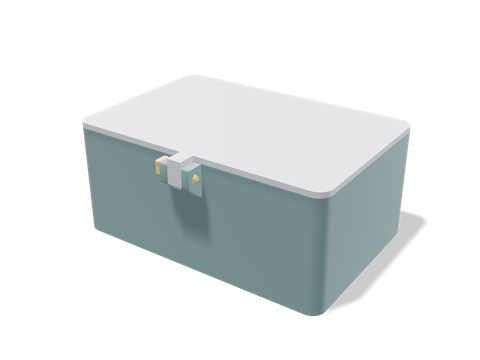 Compact locking-pin boxA three-part box: the 3MF keeps the box, lid and pin as separate named objects on one plate.120 × 88 × 52 mm · 91 g · 2 h 17 min
Big models are where 3MF really earns its place. If a print needs to be split across several plates, one 3MF can carry every piece in its print orientation.
Questions people ask
Is 3MF better than STL?
For printing, usually yes: 3MF stores units, multiple parts, colours and print settings, and the file is smaller. STL is simpler and universally supported, which still makes it a good choice for sharing a single part.
Can I convert 3MF to STL?
Yes. Open the 3MF in any slicer or mesh tool and export STL. You keep the shape and lose everything else: colours, part names, plate layout and settings.
Why does my STL import at the wrong size?
STL has no units. Slicers assume millimetres, so a model exported in inches or centimetres imports 25.4× or 10× too small. 3MF stores its units, so it doesn’t have this problem.
Can I edit an STL or 3MF file like a CAD model?
Not easily. Both store a mesh of triangles, not the sketches and dimensions it was built from. To change a hole from 5 mm to 6 mm cleanly, go back to the CAD source, a STEP file or a parametric model.
Sources and method
The numbers come from Loftsmith’s CAD engine, which uses them to design and check every part it builds, and from the manufacturer and reference sources below. Every figure is checked against those sources and the engine’s own geometry. Found a mistake? Email [email protected] and we’ll fix it.