Print-in-place cable drag chain
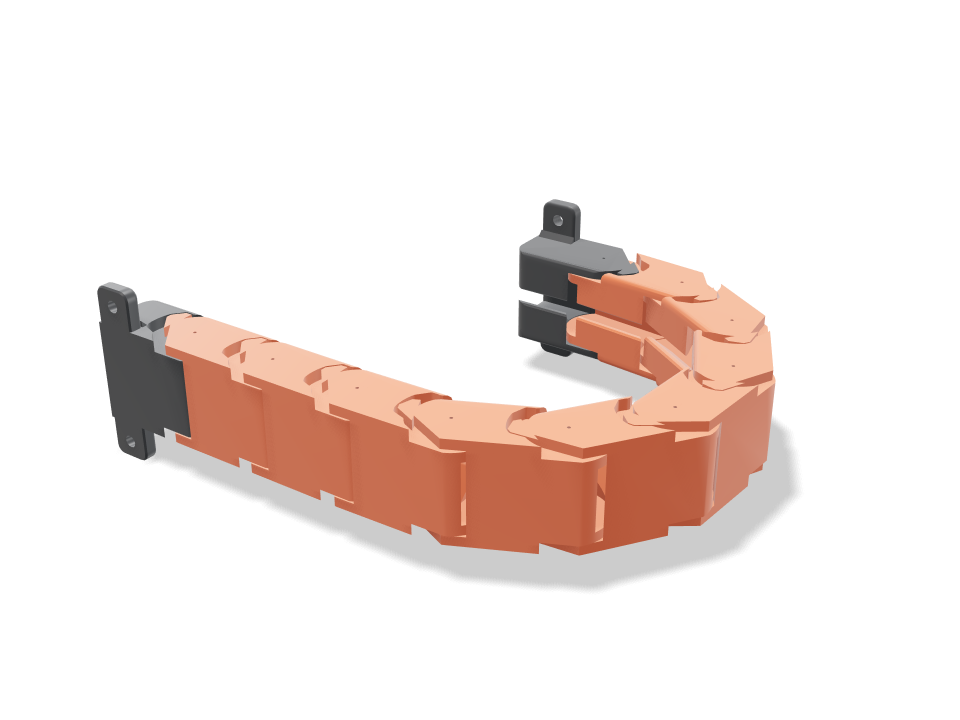
A cable drag chain (energy chain) for a 3D printer or CNC axis that comes off the bed already linked: nine identical orange links on cone pins, with a charcoal fixed bracket and moving bracket that screw on with two M3 screws each. Press Travel and the moving end runs 150 mm in and out while the chain rolls through its U-bend, the way it does on a real axis. A stop tooth on every joint lets each link bend only to the radius you set and only one way, so the upper run stays almost straight instead of sagging. The checks prove the links never touch at rest, the pins cannot pull out, the stops catch both ways, the leads lie free in the chain both straight and in the U at a gentle bend, and every one of the 457 motion poses is clear.
Ask for the sizes you want to tweak, e.g. “make the width adjustable”.
Specs at the default size
Measured from the actual build on a Bambu Lab A1 in pla. Every number updates live when you drag a slider above.
- Overall size
- 284 × 19 × 48 mm
- Parts
- 11
- Filament
- 65 g
- Print time
- 2 h 29 min
- Build plates
- 1
- Supports
- None needed
Engineering checks
- Links never touch at rest0.4 mm joint gap at every pin, plate and stop face
- Pins are captureda link shifted 0.92 mm sideways or 0.70 mm along the pin hits its neighbour (2.65 / 83.20 mm³): the cone pins sit in the sockets between the cheeks and cannot pull out
- Bends freely to the bend angle30.2 degrees per joint gives a 50 mm bend radius at a 26.0 mm pitch (6.0 links per half turn)
- Stop at the bend angle4 degrees past the bend the tooth is into its pocket wall (3.22 mm³)
- Stays straight the other wayreverse bend stops within 2.25 degrees per joint (tooth on the straight stop)
- Upper run is self-supportinga 100 mm stick-out puts 0.98 N on each stop tooth (0.06 MPa shear; PLA allows 5.0); stop play lets the longest upper run (6 links) sag about 4.6 mm
- Pins take a hard tug30 N pull on the chain: 0.48 MPa shear in the two 6.3 mm cone pins (5.0 allowed across layers)
- Cables lie free in the chainoverlap 0.00 mm³ straight and 0.00 mm³ in the U at mid travel
- Cables bend gentlythe bundle bends at 52.6 mm in the U, at least 7.5 x the 5 mm lead (37.5 mm, chain-rated cable)
- Cables stay inroof slot 4.25 mm vs 5 mm leads: each lead presses in past the 50-degree lips and cannot fall out
- Travelmoving end runs 150 mm (of 150 wanted, 158 mm possible) with the U 119 mm tall
- Every body starts on the bedprinted standing up: every link and bracket rests on its -Y edge
- Bracket ears hold the chaina 30 N tug puts 7.4 N on the far M3 screws; 1.32 MPa in a 4 mm ear (16.7 allowed)
- Screws seat on the earsM3 heads (5.7 mm) land flat on 4 mm ears, clear of the gussets; 3.1 mm of ear outside each hole
- drag chain stays together after printingall 11 bodies are captive: none can be pulled out along any axis
- drag chain is held firmlyevery captive body is held by at least 0.8 mm (two perimeters)
- lead 1 (5 mm) goes in166 poses along its path clear of every part.
- lead 2 (5 mm) goes in166 poses along its path clear of every part.
- lead 3 (5 mm) goes in166 poses along its path clear of every part.
- M3 screws: fixed bracket goes in15 poses along its path clear of every part.
- M3 screws: moving bracket goes in15 poses along its path clear of every part.
- driver: fixed bracket screw goes in15 poses along its path clear of every part.
- driver: moving bracket screw goes in15 poses along its path clear of every part.
Adjustable sizes
| Setting | Default | Range |
|---|---|---|
| Cable bundle width | 15 mm | 10–18 mm |
| Cable bundle height (cable diameter) | 5 mm | 3.5–6.5 mm |
| Bend radius (pin line) | 50 mm | 42–60 mm |
| Link count | 9 | 7–9 |
| Joint gap | 0.4 mm | 0.3–0.6 mm |
Parts list
| Part | Qty | Size (mm) | Filament | Time |
|---|---|---|---|---|
| fixed bracket | 1 | 48 × 48 × 19 | 6 g | 14 min |
| link 1 | 1 | 52 × 52 × 19 | 6 g | 14 min |
| link 2 | 1 | 52 × 52 × 19 | 6 g | 14 min |
| link 3 | 1 | 52 × 52 × 19 | 6 g | 14 min |
| link 4 | 1 | 52 × 52 × 19 | 6 g | 14 min |
| link 5 | 1 | 52 × 52 × 19 | 6 g | 14 min |
| link 6 | 1 | 52 × 52 × 19 | 6 g | 14 min |
| link 7 | 1 | 52 × 52 × 19 | 6 g | 14 min |
| link 8 | 1 | 52 × 52 × 19 | 6 g | 14 min |
| link 9 | 1 | 52 × 52 × 19 | 6 g | 14 min |
| moving bracket | 1 | 52 × 52 × 19 | 6 g | 13 min |
How to make it
- Set the cable bundle width and height to the leads you run (height is the lead diameter), then the bend radius your axis has room for.
- Pick the link count: the Travel check tells you how far the moving end can run with that many links.
- Print the whole chain in one go, standing on the bed diagonal, then flex every joint through its full bend a few times to free it.
- Thread the leads through, screw the fixed bracket to the frame and the moving bracket to the carriage with M3 screws, then let it roll over into the U.
Print tips
- Print in PLA or PETG with 3 walls and no supports; the chain stands on its edge, so a brim helps the tall narrow links stay put.
- If the first print feels stiff, raise the joint gap 0.05 mm; if it rattles, lower it. Print one or two links first to test your printer.
FAQ
Will the chain sag when it sticks out?
Only a little: each joint can bend backwards about 2 degrees before its tooth stops it, so a 150 mm upper run held at both ends drops roughly 5 mm. Longer unsupported runs need a support tray.
How do the cables go in?
Thread them through from one end before you fit the plugs, or squeeze each lead past the slot in the roof. The slot is narrower than the lead, so it stays in once it is in.
What bend radius should I pick?
Use the bend radius your cables are rated for; chain-rated leads usually want 7.5 times their diameter or more, and the cable bend check tells you when you are below that.
Need a shape that isn't in the catalog? Describe it in your own words with text to CAD
Comments