一体造形ケーブルドラッグチェーン
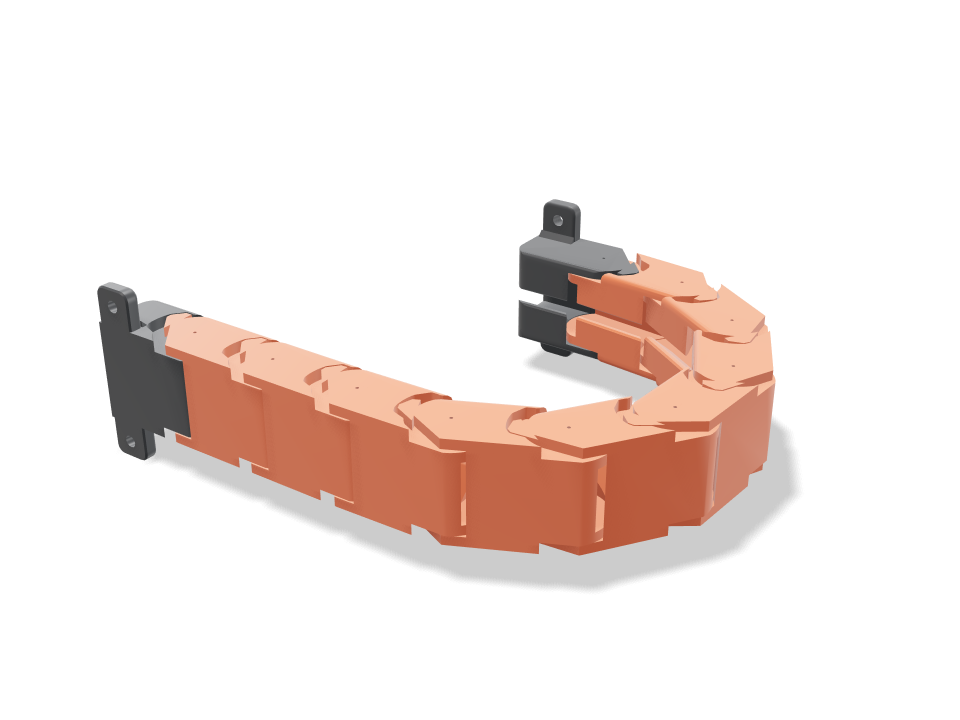
3DプリンターやCNCの軸に使うケーブルドラッグチェーン(ケーブルベア)が、つながった状態でベッドから外れます。コーン状のピンでつながった9個の同じオレンジのリンクと、それぞれM3ネジ2本で取り付けるチャコールの固定ブラケットと可動ブラケットで構成されます。Travelを押すと、可動端が150 mm出入りし、実際の軸と同じようにチェーンがU字に曲がって転がります。各ジョイントのストッパー歯が、設定した半径まで、しかも一方向にだけ曲がるように制限するので、上側の区間はたるまずほぼまっすぐに保たれます。チェックでは、静止時にリンク同士が触れないこと、ピンが抜けないこと、ストッパーが両方向で止まること、ゆるやかな曲げでまっすぐな状態でもU字でもケーブルがチェーン内で自由に収まること、457の動作姿勢すべてで干渉がないことを確認しています。
Ask for the sizes you want to tweak, e.g. “make the width adjustable”.
デフォルトサイズでの仕様
Bambu Lab A1でplaを使った実際のビルドから計測。上のスライダーを動かすと、すべての数値がリアルタイムで更新されます。
- 全体サイズ
- 284 × 19 × 48 mm
- パーツ数
- 11
- フィラメント
- 65 g
- プリント時間
- 2 h 29 min
- プレート数
- 1
- サポート
- 不要
工学チェック
チェック名とパラメーター名はCADエンジンから直接出力されるため、英語で表示されます。
- Links never touch at rest0.4 mm joint gap at every pin, plate and stop face
- Pins are captureda link shifted 0.92 mm sideways or 0.70 mm along the pin hits its neighbour (2.65 / 83.20 mm³): the cone pins sit in the sockets between the cheeks and cannot pull out
- Bends freely to the bend angle30.2 degrees per joint gives a 50 mm bend radius at a 26.0 mm pitch (6.0 links per half turn)
- Stop at the bend angle4 degrees past the bend the tooth is into its pocket wall (3.22 mm³)
- Stays straight the other wayreverse bend stops within 2.25 degrees per joint (tooth on the straight stop)
- Upper run is self-supportinga 100 mm stick-out puts 0.98 N on each stop tooth (0.06 MPa shear; PLA allows 5.0); stop play lets the longest upper run (6 links) sag about 4.6 mm
- Pins take a hard tug30 N pull on the chain: 0.48 MPa shear in the two 6.3 mm cone pins (5.0 allowed across layers)
- Cables lie free in the chainoverlap 0.00 mm³ straight and 0.00 mm³ in the U at mid travel
- Cables bend gentlythe bundle bends at 52.6 mm in the U, at least 7.5 x the 5 mm lead (37.5 mm, chain-rated cable)
- Cables stay inroof slot 4.25 mm vs 5 mm leads: each lead presses in past the 50-degree lips and cannot fall out
- Travelmoving end runs 150 mm (of 150 wanted, 158 mm possible) with the U 119 mm tall
- Every body starts on the bedprinted standing up: every link and bracket rests on its -Y edge
- Bracket ears hold the chaina 30 N tug puts 7.4 N on the far M3 screws; 1.32 MPa in a 4 mm ear (16.7 allowed)
- Screws seat on the earsM3 heads (5.7 mm) land flat on 4 mm ears, clear of the gussets; 3.1 mm of ear outside each hole
- drag chain stays together after printingall 11 bodies are captive: none can be pulled out along any axis
- drag chain is held firmlyevery captive body is held by at least 0.8 mm (two perimeters)
- lead 1 (5 mm) goes in166 poses along its path clear of every part.
- lead 2 (5 mm) goes in166 poses along its path clear of every part.
- lead 3 (5 mm) goes in166 poses along its path clear of every part.
- M3 screws: fixed bracket goes in15 poses along its path clear of every part.
- M3 screws: moving bracket goes in15 poses along its path clear of every part.
- driver: fixed bracket screw goes in15 poses along its path clear of every part.
- driver: moving bracket screw goes in15 poses along its path clear of every part.
調整できる寸法
| 設定 | 初期値 | 範囲 |
|---|---|---|
| Cable bundle width | 15 mm | 10–18 mm |
| Cable bundle height (cable diameter) | 5 mm | 3.5–6.5 mm |
| Bend radius (pin line) | 50 mm | 42–60 mm |
| Link count | 9 | 7–9 |
| Joint gap | 0.4 mm | 0.3–0.6 mm |
パーツリスト
| パーツ | 数量 | サイズ(mm) | フィラメント | 時間 |
|---|---|---|---|---|
| fixed bracket | 1 | 48 × 48 × 19 | 6 g | 14 min |
| link 1 | 1 | 52 × 52 × 19 | 6 g | 14 min |
| link 2 | 1 | 52 × 52 × 19 | 6 g | 14 min |
| link 3 | 1 | 52 × 52 × 19 | 6 g | 14 min |
| link 4 | 1 | 52 × 52 × 19 | 6 g | 14 min |
| link 5 | 1 | 52 × 52 × 19 | 6 g | 14 min |
| link 6 | 1 | 52 × 52 × 19 | 6 g | 14 min |
| link 7 | 1 | 52 × 52 × 19 | 6 g | 14 min |
| link 8 | 1 | 52 × 52 × 19 | 6 g | 14 min |
| link 9 | 1 | 52 × 52 × 19 | 6 g | 14 min |
| moving bracket | 1 | 52 × 52 × 19 | 6 g | 13 min |
作り方
- ケーブル束の幅と高さを通すケーブルに合わせて(高さはケーブルの直径)設定し、軸に余裕のある曲げ半径を選びます。
- リンク数を選びます。Travelチェックが、そのリンク数で可動端がどこまで動けるかを示します。
- チェーン全体をベッドの対角線上に立てて一度にプリントし、すべてのジョイントを可動域いっぱいに何度か曲げてほぐします。
- ケーブルを通し、固定ブラケットをフレームに、可動ブラケットをキャリッジにM3ネジで取り付け、チェーンをU字に転がします。
プリントのコツ
- PLAかPETGで3壁、サポートなしでプリントします。チェーンは縁で立つので、背が高く細いリンクが動かないようブリムを付けると安心です。
- 最初のプリントが固く感じたらジョイント隙間を0.05 mm上げ、ガタつくなら下げます。まず1〜2個のリンクでプリンターを試しましょう。
よくある質問
突き出した部分はたるみませんか?
少しだけです。各ジョイントはストッパー歯で止まるまで約2度逆方向に曲がれるので、両端で支えた150 mmの上側区間はおよそ5 mm下がります。支えのない長い区間にはサポートトレイが必要です。
ケーブルはどうやって入れますか?
プラグを付ける前に片端から通すか、各ケーブルを天井のスロットから押し込みます。スロットはケーブルより狭いので、一度入れば外れません。
曲げ半径はどう選べばいいですか?
ケーブルの定格曲げ半径を使ってください。チェーン用ケーブルは通常、直径の7.5倍以上が必要です。それを下回るとケーブル曲げチェックが知らせます。
カタログにない形が必要ですか? 「テキストからCAD」で、自分の言葉で説明してください
Comments