ボールジョイント式GoProデスクアーム
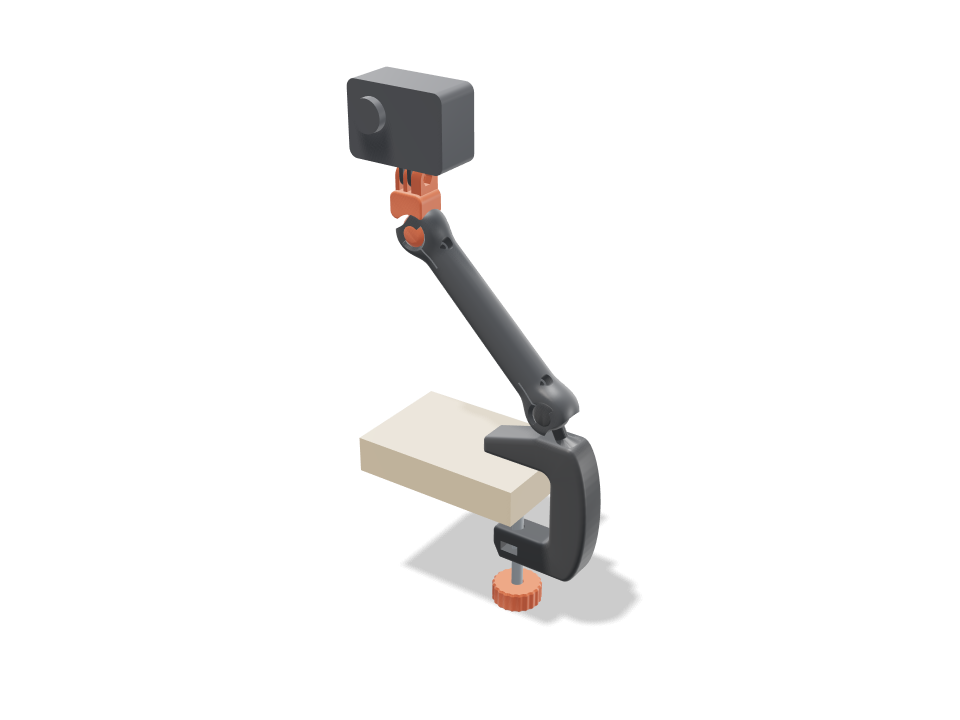
机の端にクランプで固定し、標準の3本爪マウントでGoProを支えるカメラアームです。カーブしたCクランプ、先細りのアーム、カメラヘッドは、2つのボールジョイントがソケットに収まった状態で、ひとつの平らなパーツとしていっしょにプリントされます。各ボールは小さく均一な隙間でソケットに収まり、最も太い部分を越えて包み込むリップがあるので、回ったり傾いたりはしても抜けません。クランプ側のボールは机の外へ張り出し、各ジョイントはどの方向にも約29度傾き、ぐるりと一周回るので、アームは約45度外へ伸びつつヘッドでカメラを水平に保てます。ジョイントごとに1本のM4ネジで割りソケットを締め付けて姿勢を固定します。チェックでは、ボールが離れてプリントされ抜けないこと、ネックがリップに当たるまで各ジョイントがどこまで傾くか、クランプの角とボールのネックが余裕をもって荷重を支えること、ネジがカメラに必要な約4倍の保持力を出すこと、クランプが15〜45 mmの天板に合うことを確認しています。
Ask for the sizes you want to tweak, e.g. “make the width adjustable”.
デフォルトサイズでの仕様
Bambu Lab A1でplaを使った実際のビルドから計測。上のスライダーを動かすと、すべての数値がリアルタイムで更新されます。
- 全体サイズ
- 148 × 34 × 294 mm
- パーツ数
- 5
- フィラメント
- 73 g
- プリント時間
- 2 h 3 min
- プレート数
- 2
- サポート
- 不要
工学チェック
チェック名とパラメーター名はCADエンジンから直接出力されるため、英語で表示されます。
- Flare runs into the head blockthe flare grows to 15.6 mm across, 1.5 mm inside the block's rounded edge, and enters the cup with 0.0 mm of straight neck showing
- Ball captured past the equatorsocket wraps 37 deg past the equator; opening 19.6 mm vs ball 24 mm (21.6 mm across the flats, so even panned 90 deg there is 1.0 mm of lip); pulling either joint 1.15 mm out hits the lip
- Joints print free0.35 mm surface gap all round each ball; 1.01 mm between ball and socket at the bed
- Tilt cone at the clamp jointfree to 29 deg in all four directions (0.00/0.00/0.00/0.00 mm3); the neck meets the lip by 33/33/33/33 deg; pan unlimited
- Tilt cone at the camera jointhead swings 29 deg each way on the arm (0.00/0.00/0.00/0.00 mm3)
- Aiming pose cleararm leans 45 deg out over the desk (stud 25 + joint 20), camera level and facing forward; each joint at 20 of 30 deg
- Ball neck takes a bump14.9 MPa in the 8.6 mm neck with the arm at its widest reach (55 deg from vertical), camera bumped (x2, root Kt 1.67); PLA allows 16.7 along the layers
- Pinch screw holds the pose1.23 N m of friction from an M4 snugged to 0.4 N m vs 0.28 N m from the camera and arm at widest reach (x4.4); slit 1.2 mm closes 0.70 mm to grip
- Clamp corners carry the bolt13.2 MPa inside the 7 mm corner bends (curved beam x1.70, measured sections 22 / 22 mm) at 313 N from a 0.5 N m knob twist; PLA allows 16.7 along the layers
- Clamp will not rock on the desk5.3 N m of jaw grip vs 0.95 N m from the arm sticking straight out, bumped
- Fits desks 15-45 mmM8 x 80: at 15 mm the knob sits 12 mm under the jaw, at 45 mm the pad clears the jaw by 3 mm; throat 54 mm
- GoPro fingers fit the prongs3 prongs 3 mm thick with 3.1 mm gaps (15.2 mm stack), M5 bore, nut pocket in the outer prong
- Thumb screw goes throughM5 thumb screw from the left into the captured nut
- Prints in one goclamp, arm and head lie flat in a 219 mm square turned 21 deg on the 256 mm bed, 21.6 mm tall
- Pad and knob sit on the boltpad pressed on the bolt tip against the desk underside, knob on the bolt head 22 mm under the jaw
- camera arm stays together after printingall 3 bodies are captive: none can be pulled out along any axis
- camera arm is held firmlyevery captive body is held by at least 0.8 mm (two perimeters)
- GoPro goes in35 poses along its path clear of every part.
- thumb screw goes in20 poses along its path clear of every part.
- M8 nut goes in20 poses along its path clear of every part.
- M4 x 16 pinch screw 1 goes in15 poses along its path clear of every part.
- M4 x 16 pinch screw 2 goes in15 poses along its path clear of every part.
調整できる寸法
| 設定 | 初期値 | 範囲 |
|---|---|---|
| Arm length (ball to ball) | 140 mm | 100–150 mm |
| Desk thickness | 25 mm | 15–45 mm |
| Ball diameter | 24 mm | 20–28 mm |
| Joint gap (each side) | 0.35 mm | 0.3–0.45 mm |
パーツリスト
| パーツ | 数量 | サイズ(mm) | フィラメント | 時間 |
|---|---|---|---|---|
| clamp | 1 | 95 × 133 × 22 | 34 g | 50 min |
| arm | 1 | 156 × 89 × 22 | 24 g | 38 min |
| camera head | 1 | 40 × 53 × 22 | 8 g | 17 min |
| clamp pad | 1 | 26 × 26 × 6 | 2 g | 7 min |
| clamp knob | 1 | 34 × 34 × 14 | 5 g | 12 min |
作り方
- 天板の厚さと希望のアーム長を設定し、ボールサイズを選びます。ボールが大きいほど少し深く傾き、保持力も強くなります。
- アームは背面を下にしてサポートなしで一度にプリントし、続けてノブとパッドをプリントします。テストプリントがきつすぎたりゆるすぎたりしない限り、ジョイント隙間は0.35 mmのままにします。
- 各ボールをしっかりひねって外し、M4ネジとナット2組を取り付け、M8ボルトの頭をノブに、M8ナットをクランプのスロットに押し込みます(ボルトの長さはビルドが表示します。デフォルトサイズではM8 x 80)。
- 机にクランプし、GoProの爪をつまみネジでマウントに差し込んで向きを決め、M4ネジを締めて姿勢を固定します。
プリントのコツ
- サポートはオフに。サポート材がジョイントの隙間に入り込み、ボールが溶着してしまいます。
- PLAかPETGの3壁でよく動きます。なめらかなPEIプレートを使い、1層目を確認してください。1層目がつぶれることが、ボールがソケットにくっつく一番の原因です。
- 外した後にジョイントが固く感じたら、カメラを付ける前にそれぞれを可動域いっぱいに何度か動かしましょう。
よくある質問
GoProを付けても垂れ下がりませんか?
M4の締め付けネジを締めれば大丈夫です。チェックでは、アームを最も伸ばした状態でGoProを支えるのに必要な摩擦の約4倍が出ています。ネジをゆるめるとジョイントは自由に動くので、それで向きを合わせます。
スマホにも使えますか?
先端は標準のGoPro 3本爪マウントなので、GoPro用の爪が付いたスマホクリップなら取り付けられます。スマホクリップ自体はこのデザインに含まれていません。
必要な金具は?
クランプ用にM8ボルトとナット1組(デフォルトサイズではM8 x 80)、ジョイント用にM4ネジとナット2組(デフォルトサイズではM4 x 16)、カメラ用にGoProのつまみネジとM5ナット。スライダーに合わせた正確な長さはビルドが表示します。
カタログにない形が必要ですか? 「テキストからCAD」で、自分の言葉で説明してください
Comments